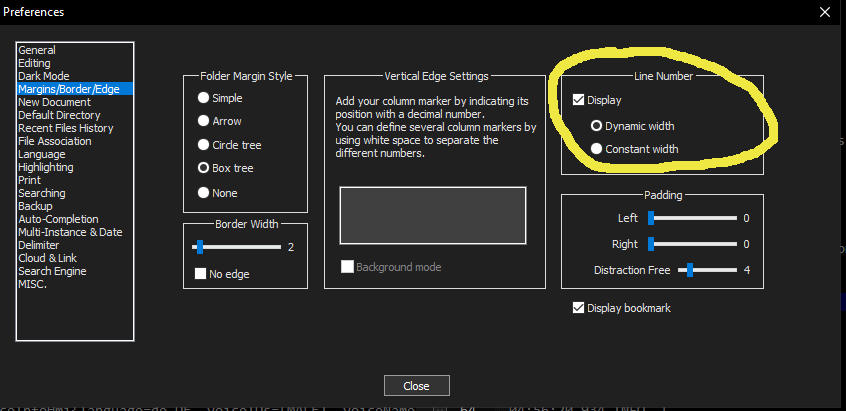
Notepad++ show line numbers
It’s a little hidden imo, so future-me or for your service – the setting to show the line numbers.
I like to use the “other view” feature of Notepad++ to show two files side by side. As I often have compare them I really like the synchronized vertical scrolling option which scrolls them both at the same time. There’s an icon you can click, but I prefer to use a key binding to toggle…

As I really prefer Python for my little projects over C++, I flashed my Wemos boards with Micropython and wanted to share how I did it (it was pretty easy). You have to connect your board with USB to your computer, have Thonny installed and the desired micropython image downloaded. (You can do it with…

Yeah we all can loop, but can you any or all? Checking if condition matches for at least one element of an iterable (e.g. list, tuple, set) In Python you can write that nicer with the builtin method any(): But who doesn’t like a one-liner (that is understandable): Very similar is the case if you…

This short HowTo is about a problem I had with the Analyse Plugin for Notepad++. The Main window with the text and the one with the filters were still shown, but the result window disappeared and it wasn’t an instant fix to display it again. This is was worked for me:After a quick search I…

As most of the time – there are multiple valid ways of doing it. Keeping the order I prefer easy and readable, if it is not crucial for performance to go another way.Create a new list and add only values to it that are not already included. You can do this with a simple list…

Plain and simple (or better in the case I forget it again). You can add the device when pulling and starting the HomeAssistant container. Make sure to adapt config path to yours.Add “–device/dev/NameOfDevice” If you don’t know the path of the USB device you can see a list of them with this command: I a…